How to Modernize a Legacy PHP Application Without Rebuilding Everything
Many businesses depend on PHP applications that were built years ago.
These systems may still handle important operations such as customers, orders, bookings, payments, inventory, reports, or internal business processes.
The problem is that an application does not need to be completely broken to become a problem.
Over time, a legacy PHP system can become difficult to maintain, slow, insecure, difficult to integrate with modern services, or dependent on outdated technologies.
The good news is that you do not always need to rebuild the entire application from scratch.
A carefully planned modernization strategy can improve an existing PHP system while keeping the business running.
What Is a Legacy PHP Application?
A legacy application is not necessarily an old or bad application.
In many cases, it is simply a system that has been running for several years and has accumulated technical debt.
A legacy PHP application may have:
- Old PHP versions
- Outdated libraries
- Poorly structured code
- Large files containing many responsibilities
- Database queries that are difficult to maintain
- Limited documentation
- Security vulnerabilities
- No automated tests
- Weak separation between frontend and backend
- Difficult deployment processes
- Limited API capabilities
- Integrations that depend on obsolete services
Despite these problems, the application may still be extremely valuable to the business.
That is why replacing everything immediately is often unnecessary and expensive.
Should You Rewrite the Entire Application?
Usually, the answer is: not immediately.
A complete rewrite can take months and introduce significant risks.
During a rewrite, the business may have to maintain two systems simultaneously while developers attempt to reproduce existing functionality.
There is also a serious risk of losing business logic that exists inside the old application but is poorly documented.
Instead of asking:
“How can we rebuild this application?”
a better question is:
“Which parts of this application actually need to change?”
This leads to a more controlled modernization strategy.
1. Start With a Technical Assessment
Before changing the application, you need to understand what you already have.
A technical assessment should examine:
- PHP version
- Framework or custom architecture
- Database structure
- Dependencies
- Authentication
- Security configuration
- Application performance
- API architecture
- Server configuration
- Deployment process
- External integrations
- Critical business processes
The objective is not simply to find problems.
The objective is to understand which problems are important enough to solve first.
A business application may contain hundreds of technical issues, but only a few of them may actually affect the business.
2. Identify the Critical Business Logic
One of the biggest mistakes during modernization is focusing only on the code.
The code exists to support the business.
Before changing a legacy application, identify the processes that cannot fail.
For example:
- Customer registration
- Orders
- Reservations
- Payments
- Inventory
- Invoicing
- Reports
- User management
- Data imports
- External integrations
These processes should receive special attention during modernization.
The goal is to improve the technology without breaking the business.
3. Upgrade PHP Carefully
Running an outdated PHP version can create security, compatibility, and maintenance problems.
However, upgrading PHP should not be treated as simply changing the version number on the server.
Older applications may depend on:
- Deprecated functions
- Old extensions
- Incompatible libraries
- Legacy frameworks
- Outdated database drivers
- Custom code written for older PHP behavior
A controlled upgrade process should identify compatibility problems before production deployment.
In some cases, the application can be upgraded incrementally.
For example:
Old PHP version → intermediate modernization → current supported PHP version
This can be much safer than attempting a massive migration in one step.
4. Refactor the Most Problematic Code
Legacy systems often contain large functions or files that perform too many responsibilities.
For example, one PHP file might simultaneously:
- Receive an HTTP request
- Validate user input
- Query the database
- Apply business logic
- Generate HTML
- Send emails
This makes the system difficult to test and modify.
Instead of rewriting the entire application, developers can gradually separate these responsibilities.
For example:
Request → Controller → Business Logic → Database → Response
This creates a cleaner architecture while allowing the existing system to continue operating.
5. Improve Database Performance
Many legacy PHP applications have accumulated inefficient database queries.
Common problems include:
- Missing indexes
- Repeated queries
- Large unoptimized queries
- Unnecessary joins
- Loading too much data
- Poor database structure
- Inefficient pagination
Before changing the database architecture, it is often useful to identify the queries that actually cause performance problems.
A small number of optimized queries can sometimes produce a significant improvement in application performance.
6. Introduce APIs
One of the most useful modernization strategies is turning parts of an existing system into services that can communicate through APIs.
This allows the existing application to communicate with:
- Mobile applications
- Modern web interfaces
- External services
- Payment platforms
- CRM systems
- ERP systems
- Business dashboards
- IoT devices
- Automation platforms
Instead of replacing the entire backend, the existing system can gradually become the foundation for new services.
This is particularly useful for businesses that already have years of operational data inside their PHP application.
7. Improve Security
Security should be part of modernization from the beginning.
A legacy PHP application should be reviewed for issues such as:
- SQL injection
- Cross-site scripting
- Weak authentication
- Insecure passwords
- Missing authorization controls
- Unsafe file uploads
- Exposed credentials
- Outdated dependencies
- Insecure API endpoints
Security improvements can often be introduced gradually without changing the entire application architecture.
8. Add Monitoring and Backups
Modernization is not complete if nobody knows when the system fails.
A production application should have appropriate monitoring for:
- Server availability
- Application errors
- Database problems
- Response time
- Disk usage
- Failed integrations
- Security events
Backups are equally important.
A business should know:
What is being backed up?
How frequently?
Where is it stored?
Can it actually be restored?
A backup that has never been tested is not a reliable recovery strategy.
9. Modernize Incrementally
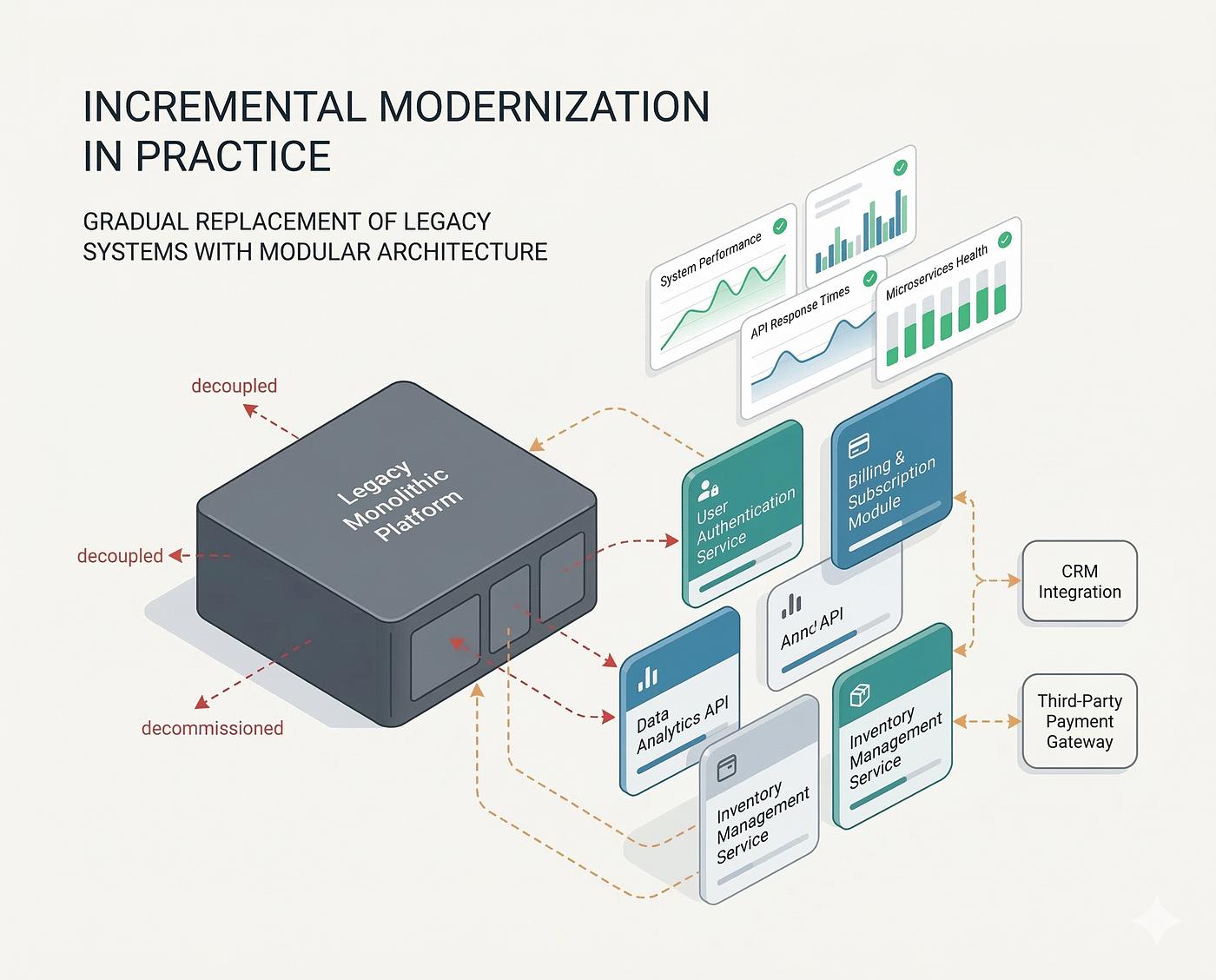
The safest approach for many businesses is incremental modernization.
Instead of:
Old system → completely new system
use:
Existing system → assessment → improvements → new services → gradual replacement
This allows the business to continue operating while the technology improves.
For example:
Phase 1
Technical assessment and security review.
Phase 2
PHP and dependency modernization.
Phase 3
Database and performance improvements.
Phase 4
API development and integrations.
Phase 5
Modern frontend or new modules.
Phase 6
Gradual replacement of obsolete components.
This approach reduces risk and makes costs easier to control.
When Should You Modernize a Legacy PHP Application?
Modernization is worth considering when:
- Your application is difficult to maintain.
- Developers are afraid to modify existing code.
- The PHP version is outdated.
- Security updates are becoming difficult.
- The system is becoming slower.
- You need new integrations.
- Your business depends heavily on the application.
- You cannot easily hire developers to work on it.
- The system contains valuable historical data.
- Rebuilding everything would be too expensive or risky.
You do not necessarily need a completely new system.
You may simply need a better version of the system you already have.
Need Help With an Existing PHP Application?
If your business already has a PHP application that needs modernization, optimization, security improvements, API integrations, or ongoing maintenance, ExoTechHub can help evaluate the existing system and identify a practical modernization strategy.
You don’t have to rebuild everything.
Start with an assessment of what you already have.
→ Contact ExoTechHub to discuss your PHP application and your modernization needs.
A Better Approach to Legacy Software
Legacy software is not automatically useless software.
In many cases, it represents years of business knowledge, customer data, workflows, and operational experience.
The objective of modernization is not to destroy that investment.
The objective is to preserve what works, improve what does not, and gradually introduce better technology.
A well-planned modernization strategy can extend the useful life of an existing PHP application while making it more secure, maintainable, scalable, and easier to integrate with modern systems.
If your company has an existing PHP application that has become difficult to maintain, ExoTechHub can help you evaluate the system and determine what should be improved, refactored, integrated, or replaced.